Help:MixesDB userscripts
|
|
"MixesDB userscripts" are a collection of userscripts, that change the look and behaviour of certain websites or add additional information by using Javascript and CSS.
Features
The following userscripts help MixesDB contributors with their daily copy-paste work:
- Copy-paste-ready formatted tracklists
- URLs for highest resolution artwork
- Player URLs in the format MixesDB embeds them with the player template
- API information whenever available and useful
- On player sites and websites using widget players: Search if MixesDB uses these players as well and link to the mix page
- Offer a link to submit a player URL to TrackId.net whenever possible
- On player sites: Filter to find new mixes that are not used on MixesDB
Getting started
Before you can install a userscript you need to add a userscript addon for your browser. We had bad experiences with Greasemonkey so we stick with Tampermonkey as it's avaiable for all major browsers: tampermonkey.net
After installing the browser addon, you can install the userscripts by just clicking 👉 Click to install or update below.
If you're running script blocker addons like "ScriptSafe" or "NoScript" and you see no changes or things don't seem to work:
- Allow scripts from www.mixesdb.com (if tracklists or the toolkit are added).
- Try allowing some major scripts from that website and reload the page.
Automatic updates: The scripts are under continuous development. Enable automatic script updates in your addon to get the latest version automatically.
We inform about updates on Discord where you can also report bugs, get support and request features.
Quick overview
| Userscript | Install / update |
Target website type | Players | Copy-paste tracklist |
Toolkit | ||
|---|---|---|---|---|---|---|---|
| MixesDB supported |
Multiple | Player usage | Hide used | ||||
| Player Checker | Update | Websites with embedded players | yes | no | yes | no | |
| 1001 Tracklists | Update | Tracklist generation | yes | yes | yes | not possible | |
| Apple Music | Update | Mix source | yes | no | yes, but not formatted | restricted | |
| Apple Podcasts | Update | Mix source | yes | no | no | restricted | |
| BBC | Update | Mix source | no | yes | no | ||
| Discogs | Update | Mix source | no | yes | no | ||
| hearthis.at | Update | Player site | yes | no | no | yes | no |
| Internet Archive | Update | Player site | yes | no | no | yes | no |
| Mixcloud | Update | Player site | yes | no | no | yes | |
| MixesDB Userscripts Helper | Update | On MixesDB | no | no | no | ||
| NTS | Update | Mix source | no | yes | no | ||
| RA | Update | Mix source | yes | no | yes | yes | no |
| SoundCloud | Update | Player site | yes | no | no | yes | |
| The Lot Radio | Update | Mix source | no | yes | no | ||
| TrackId.net | Update | Tracklist generation | yes | yes | yes | no, but indicated via "MixesDB integration" | |
| Tracklist Merger (Beta) | Update | On MixesDB, on TrackId.net |
no | no | no | no | no |
| Tracklist Cue Switcher | Update | On MixesDB, on TrackId.net |
no | no | no | ||
| YouTube | Update | Player site | yes | no | no | yes | no |
| Private userscripts | Install / update |
Description |
|---|---|---|
| Episodes Importer | For show or podcast websites this adds buttons on episode listings to view or create pre-filled mix pages.
This is useful for shows and podcasts of which many episodes are still missing on MixesDB, not for adding 1 new mix per week. The episodes on the website need to be numbered or read the date we sue for the mix pages. | |
| Hernan Cattaneo Resident | Update | Mix pages for Category:Resident (Show) from podcast.hernancattaneo.com |
| IA MIX | Update | Mix pages for Category:IA MIX from inverted-audio.com/mix |
| Player URLs | Adds missing player URLs from a pre-defined array of URLs and the episode number or date matching MixesDB mix pages.
The mixesdb.com part does the auto-save and "Edit all pages" link on MixesDB:Explorer/Lists (query pages not the category for player site players). Matching IDs or date of the array with the MixesDB page titles happens with regex in the userscript. Adjust for each new category name. | |
| Apple Podcasts | Update | The IDs are listed in the console log. Use that to build the ID array in the userscript. |
| YouTube | Update | Does not run on youtube.com (Chrome not supported, Safari is a mess). Thus the ID array can be created using an .sh script with yt-dlp.
The txt file tries to normalize the YouTube title keys to only the episode number or date, then sorts the items. For raw yt-dlp results use the script option Copy the array to the userscript manually. |
Shared features
Tracklist box
Toolkit
Page creator
Site specific userscripts
Userscripts that target one specific website.
1001 Tracklists
![Tracklist page with toolkit for various player sites and copy-ready tracklist [1]](/w/thumb.php?f=1001_Tracklists_userscript_-_Tracklist_page.png&width=162) Tracklist page with toolkit for various player sites and copy-ready tracklist [1]
Tracklist page with toolkit for various player sites and copy-ready tracklist [1]
![Tracklist page with toolkit for various player sites and copy-ready tracklist [1]](/w/File:1001_Tracklists_userscript_-_Tracklist_page.png)
Planned features
- Consider "Switch cue format" button
- Add link to Tracklist Merger
Apple Music
![A mix page [2] with IDs. These are often used on live sets.](/w/thumb.php?f=Apple_Music_userscript_-_Mix_page_with_IDs.png&width=180) A mix page [2] with IDs. These are often used on live sets.
A mix page [2] with IDs. These are often used on live sets.![A Mix CD page [3].](/w/thumb.php?f=Apple_Music_userscript_-_Mix_CD.png&width=171) A Mix CD page [3].
A Mix CD page [3].![A pre-release page [4] with missing durations (unavailable songs). No [CUE] minutes are added.](/w/thumb.php?f=Apple_Music_userscript_-_Pre-release.png&width=165) A pre-release page [4] with missing durations (unavailable songs). No [CUE] minutes are added.
A pre-release page [4] with missing durations (unavailable songs). No [CUE] minutes are added.
![A mix page [2] with IDs. These are often used on live sets.](/w/File:Apple_Music_userscript_-_Mix_page_with_IDs.png)
![A Mix CD page [3].](/w/File:Apple_Music_userscript_-_Mix_CD.png)
![A pre-release page [4] with missing durations (unavailable songs). No [CUE] minutes are added.](/w/File:Apple_Music_userscript_-_Pre-release.png)
Planned features
- On albums
- Add a "File details" toggle for the total duration.
- Fix dark textarea with OS light mode.
- Instead of leading the tracklist area on all pages, add a user option to append a button to the header area (less flickering).
Apple Podcasts
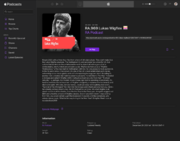 Episode page
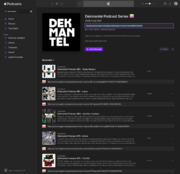 Podcast page
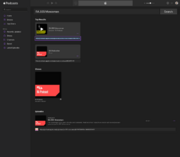 Search results page


hearthis.at
![Player page with used player URL [5]](/w/File:hearthis.at_userscript_-_Used_player.png)
![Player page with unused player URL [6]](/w/File:hearthis.at_userscript_-_Unused_player.png)
Internet Archive
![Single file page [7]](/w/thumb.php?f=Internet_Archive_userscript_-_Single_file_page.png&width=180) Single file page [7]
Single file page [7]![Collection page with details for each file [8]](/w/thumb.php?f=Internet_Archive_userscript_-_Collection_page.png&width=180) Collection page with details for each file [8]
Collection page with details for each file [8]![Dead page with no embed URL to check [9]](/w/thumb.php?f=Internet_Archive_userscript_-_Dead_page_with_no_embed_URL.png&width=180) Dead page with no embed URL to check [9]
Dead page with no embed URL to check [9]
![Single file page [7]](/w/File:Internet_Archive_userscript_-_Single_file_page.png)
![Collection page with details for each file [8]](/w/File:Internet_Archive_userscript_-_Collection_page.png)
![Dead page with no embed URL to check [9]](/w/File:Internet_Archive_userscript_-_Dead_page_with_no_embed_URL.png)
Mixcloud
![Player page with several added elements like the original image URL [10]](/w/thumb.php?f=Mixcloud_userscript_-_Player_page.png&width=180) Player page with several added elements like the original image URL [10]
Player page with several added elements like the original image URL [10]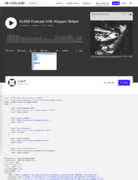 Expanded "File details" table and API
![Filter options to hide used players [11]](/w/thumb.php?f=Mixcloud_userscript_-_User_page_-_Filter_options.png&width=177) Filter options to hide used players [11]
Filter options to hide used players [11]
![Player page with several added elements like the original image URL [10]](/w/File:Mixcloud_userscript_-_Player_page.png)

![Filter options to hide used players [11]](/w/File:Mixcloud_userscript_-_User_page_-_Filter_options.png)
RA
![Top section of a podcast page using toolkit, original artwork info and the tracklist moved up from the bottom [12]](/w/thumb.php?f=RA_-_Podcast_page_-_Top_section.png&width=128) Top section of a podcast page using toolkit, original artwork info and the tracklist moved up from the bottom [12]
Top section of a podcast page using toolkit, original artwork info and the tracklist moved up from the bottom [12]![Copy-paste tracklist on a podcast page [13]](/w/thumb.php?f=RA_-_Podcast_page_-_Tracklist.png&width=180) Copy-paste tracklist on a podcast page [13]
Copy-paste tracklist on a podcast page [13]![Artist profile page with name action icons to copy the name or search it on MixesDB (sam functionality for venue pages)[14]](/w/thumb.php?f=RA_-_Artist_page.png&width=163) Artist profile page with name action icons to copy the name or search it on MixesDB (sam functionality for venue pages)[14]
Artist profile page with name action icons to copy the name or search it on MixesDB (sam functionality for venue pages)[14]
![Top section of a podcast page using toolkit, original artwork info and the tracklist moved up from the bottom [12]](/w/File:RA_-_Podcast_page_-_Top_section.png)
![Copy-paste tracklist on a podcast page [13]](/w/File:RA_-_Podcast_page_-_Tracklist.png)
![Artist profile page with name action icons to copy the name or search it on MixesDB (sam functionality for venue pages)[14]](/w/File:RA_-_Artist_page.png)
![Event page with name action icons and flyer image info [15] [16]](/w/File:RA_-_Event_page_-_Flyer_image_info.png)
SoundCloud
![Player page with several added elements like the original image URL [17]](/w/thumb.php?f=SoundCloud_userscript_-_Creation_date%2C_indiator_for_available_download%2C_duration_and_API_buttons.png&width=163) Player page with several added elements like the original image URL [17]
Player page with several added elements like the original image URL [17]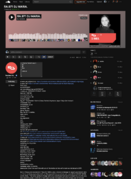 Expanded "File details" table and API
![Toolkit: When the player URL is not used on MixesDB, a link to search the player title is added. [18]](/w/thumb.php?f=SoundCloud_userscript_-_No_player_URL_usage.png&width=180) Toolkit: When the player URL is not used on MixesDB, a link to search the player title is added. [18]
Toolkit: When the player URL is not used on MixesDB, a link to search the player title is added. [18]![Profile page with hiding and filter options on top, highlighted titles for favorited players and an remove icon for each player [19]](/w/thumb.php?f=SoundCloud_userscript_-_Account_page.png&width=180) Profile page with hiding and filter options on top, highlighted titles for favorited players and an remove icon for each player [19]
Profile page with hiding and filter options on top, highlighted titles for favorited players and an remove icon for each player [19]![Feed page with hiding and filtering options to find new hot mixes [20]](/w/thumb.php?f=SoundCloud_userscript_-_Feed_page_with_hiding_and_filtering_options_used.png&width=145) Feed page with hiding and filtering options to find new hot mixes [20]
Feed page with hiding and filtering options to find new hot mixes [20]![Player links on playlists pages [21]](/w/thumb.php?f=SoundCloud_userscript_-_Player_links_on_playlists_pages.png&width=141) Player links on playlists pages [21]
Player links on playlists pages [21]![Player links in compact playlists (e.g. on playlists pages) [22]](/w/thumb.php?f=SoundCloud_userscript_-_Player_links_in_compact_playlists.png&width=169) Player links in compact playlists (e.g. on playlists pages) [22]
Player links in compact playlists (e.g. on playlists pages) [22]
![Player page with several added elements like the original image URL [17]](/w/File:SoundCloud_userscript_-_Creation_date,_indiator_for_available_download,_duration_and_API_buttons.png)

![Toolkit: When the player URL is not used on MixesDB, a link to search the player title is added. [18]](/w/File:SoundCloud_userscript_-_No_player_URL_usage.png)
![Profile page with hiding and filter options on top, highlighted titles for favorited players and an remove icon for each player [19]](/w/File:SoundCloud_userscript_-_Account_page.png)
![Feed page with hiding and filtering options to find new hot mixes [20]](/w/File:SoundCloud_userscript_-_Feed_page_with_hiding_and_filtering_options_used.png)
![Player links on playlists pages [21]](/w/File:SoundCloud_userscript_-_Player_links_on_playlists_pages.png)
![Player links in compact playlists (e.g. on playlists pages) [22]](/w/File:SoundCloud_userscript_-_Player_links_in_compact_playlists.png)
Known issues
- On player pages
- The audio file size is no more included in the API details. Theoretically it could be received by the same additional API call for the download URL.
TrackId.net
TrackId.net ("TID") is currently the best tool to retrieve automated tracklist generation via player URLs.
Unfortunately a premium account is required to submit new URLs (20 GBP / year). But there are over 230K existing pages and this userscript makes all tracklists copy-paste-ready.
See also MixesDB Userscripts Helper for more TID features on MixesDB.
![Mix page with embedded player, toolkit and copy-ready tracklist [23]](/w/thumb.php?f=TrackId.net_userscript_-_Mix_page.png&width=180) Mix page with embedded player, toolkit and copy-ready tracklist [23]
Mix page with embedded player, toolkit and copy-ready tracklist [23]![Mix page where the toolkit reads that the TID tracklist was integrated to the MixesDB mix page. [24]](/w/thumb.php?f=TrackId.net_userscript_-_Mix_page%2C_integrated.png&width=180) Mix page where the toolkit reads that the TID tracklist was integrated to the MixesDB mix page. [24]
Mix page where the toolkit reads that the TID tracklist was integrated to the MixesDB mix page. [24]![Toolkit information that the page was created after the matched MixesDB page was last edited. This can also appear on tracklists marked as integrated, i.e. when the TID tracklist had no new tracks, thus no edit was made. [25]](/w/thumb.php?f=TrackId.net_userscript_-_Page_created_after_last_MixesDB_edit.png&width=175) Toolkit information that the page was created after the matched MixesDB page was last edited. This can also appear on tracklists marked as integrated, i.e. when the TID tracklist had no new tracks, thus no edit was made. [25]
Toolkit information that the page was created after the matched MixesDB page was last edited. This can also appear on tracklists marked as integrated, i.e. when the TID tracklist had no new tracks, thus no edit was made. [25]![Handling of hearthis.at players on mix pages [26]](/w/thumb.php?f=TrackId.net_userscript_-_hearthis.at_player_handling.png&width=180) Handling of hearthis.at players on mix pages [26]
Handling of hearthis.at players on mix pages [26]![In tables (search, "My Requests") a row is added to indicate which pages are marked as "tracklist integrated" and which do not. [27]](/w/thumb.php?f=TrackId.net_userscript_-_Tables.png&width=180) In tables (search, "My Requests") a row is added to indicate which pages are marked as "tracklist integrated" and which do not. [27]
In tables (search, "My Requests") a row is added to indicate which pages are marked as "tracklist integrated" and which do not. [27]
![Mix page with embedded player, toolkit and copy-ready tracklist [23]](/w/File:TrackId.net_userscript_-_Mix_page.png)
![Mix page where the toolkit reads that the TID tracklist was integrated to the MixesDB mix page. [24]](/w/File:TrackId.net_userscript_-_Mix_page,_integrated.png)
![Toolkit information that the page was created after the matched MixesDB page was last edited. This can also appear on tracklists marked as integrated, i.e. when the TID tracklist had no new tracks, thus no edit was made. [25]](/w/File:TrackId.net_userscript_-_Page_created_after_last_MixesDB_edit.png)
![Handling of hearthis.at players on mix pages [26]](/w/File:TrackId.net_userscript_-_hearthis.at_player_handling.png)
![In tables (search, "My Requests") a row is added to indicate which pages are marked as "tracklist integrated" and which do not. [27]](/w/File:TrackId.net_userscript_-_Tables.png)
Planned features
- Search pages [44]: Option to show the regular table instead (only the regular results are sortable) (fixes the current workaround of showing both)
- Default tracklist tables: Link to search each track title on YouTube
- Check if the "change history" tab has new tracks since last check marking (requires undo function / or refresh marking to generate new timestamp)
YouTube
![Toolkit with used player URL and short embed URL for copy-paste [28]](/w/thumb.php?f=YouTube_userscript_-_Used_player_URL.png&width=180) Toolkit with used player URL and short embed URL for copy-paste [28]
Toolkit with used player URL and short embed URL for copy-paste [28]![TID playlist submit link on a playlist page [29]](/w/thumb.php?f=YouTube_userscript_-_TID_playlist_submit_link_-_on_playlist_page.png&width=180) TID playlist submit link on a playlist page [29]
TID playlist submit link on a playlist page [29]![TID playlist submit link in the sidebar of a playing video [30]](/w/thumb.php?f=YouTube_userscript_-_TID_playlist_submit_link_-_in_playlist_video_sidebar.png&width=180) TID playlist submit link in the sidebar of a playing video [30]
TID playlist submit link in the sidebar of a playing video [30]
![Toolkit with used player URL and short embed URL for copy-paste [28]](/w/File:YouTube_userscript_-_Used_player_URL.png)
![TID playlist submit link on a playlist page [29]](/w/File:YouTube_userscript_-_TID_playlist_submit_link_-_on_playlist_page.png)
![TID playlist submit link in the sidebar of a playing video [30]](/w/File:YouTube_userscript_-_TID_playlist_submit_link_-_in_playlist_video_sidebar.png)
Combined userscripts
Userscripts that are working on multiple websites or small single purpose scripts that are grouped here.
MixesDB Userscripts Helper
👉 Click to install or update | README
 TrackId.net links below every compatible player (auto fill in the request form requires the TrackId.net userscript)
 Explorer result with Apple Podcasts and TID links under each compatible player
 Apple Podcasts search icon in mix page title icons


This userscript changes the look and behaviour of the MixesDB website, mainly to enable features usable by other MixesDB userscripts.
This userscripts uses user settings which can be enabled in variables on top of the script. After an update they're reset to their default value.
TrackId.net features
On MixesDB mix pages and on MixesDB:Explorer/Mixes a TrackId.net link is added below every compatible player. It's either a submit link or a page link with info if the tracklist has been integrated to MixesDB.
The submit link is highly effective when you have a TID premium account and want to submit many player URLs for the community. Example query: Newly added pages with TID compatible players + no or incomplete tracklist + at least 1 hotness star
All this can be disabled in the user setting variables.
Apple Podcasts search
Apple Podcasts episode pages are not indexed on Google, only the show pages. This means the Player search on mix pages will not find Apple Podcast players.
So an icon to search the mix page title in Apple Podcasts directly is added to
- mix page title icons
- result titles on MixesDB:Explorer/Mixes
All this can be disabled in the user setting variables.
Apple Music links in browser
An optional feature for those who prefer Apple Music results in tracklists to open in the browser instead of the Apple Music app. For example at work or when you use multiple local Music libraries on your Mac.
These features are all optional and enabled by a user setting on top of the userscript:
- Open links in browser:
var appleMusic_linksOpenInBrowserRemove the URL parameter
&app=musicfrom album links (search links don't have this by default).
Using this also changes the URL from music.apple.com to beta.music.apple.com, which enforces bypassing the Music app and makes it actually usable in the browser with features like adding to playlists.You can always click with CMD+CLICK to bypass the Music app. - Force your country code:
var appleMusic_countryCode_switchBy default album results link to the US version (music.apple.com/us/album/...). But when you live somewhere else, you only can use previews (even if logged in). Then you'd always need to switch to your country manually. Set your own country code to avoid all this.
Example settings with links opening in the browser enabled, Germany as country code and browser links with Beta enabled:
var appleMusic_linksOpenInBrowser = 1;var appleMusic_countryCode_switch = "de";
So with links opening in the Music app disabled, clicking an album link in a tracklist will open e.g.
https://beta.music.apple.com/de/album/double-standard/1741549977?i=1741550406 in a new tab instead of
https://music.apple.com/us/album/double-standard/1741549977?i=1741550406.
Player Checker
This userscript is activated on various blogs, podcast and radio show websites. It looks for player widgets to search if these player URLs are used in MixesDB mix pages.
![finn-johannsen.de: Toolkit and copy-paste tracklists on multiple posts pages and single page support [31]](/w/thumb.php?f=Player_Checker_userscript_-_finn-johannsen.de_podcast_episode_page.png&width=90) finn-johannsen.de: Toolkit and copy-paste tracklists on multiple posts pages and single page support [31]
finn-johannsen.de: Toolkit and copy-paste tracklists on multiple posts pages and single page support [31]![groove.de: Podcast episode page [32]](/w/thumb.php?f=Player_Checker_userscript_-_groove.de_podcast_episode_page.png&width=95) groove.de: Podcast episode page [32]
groove.de: Podcast episode page [32]![ra.co: Podcast episode page [33]](/w/thumb.php?f=Player_Checker_userscript_-_ra.co_podcast_episode_page.png&width=141) ra.co: Podcast episode page [33]
ra.co: Podcast episode page [33]![ra.co: "Mix Of The Day" page [34]](/w/thumb.php?f=Player_Checker_userscript_-_ra.co_Mix_Of_The_Day_page.png&width=165) ra.co: "Mix Of The Day" page [34]
ra.co: "Mix Of The Day" page [34]![toxicfamily.de: article with player [35]](/w/thumb.php?f=Player_Checker_userscript_-_toxicfamily.de_article_with_player.png&width=126) toxicfamily.de: article with player [35]
toxicfamily.de: article with player [35]
![finn-johannsen.de: Toolkit and copy-paste tracklists on multiple posts pages and single page support [31]](/w/File:Player_Checker_userscript_-_finn-johannsen.de_podcast_episode_page.png)
![groove.de: Podcast episode page [32]](/w/File:Player_Checker_userscript_-_groove.de_podcast_episode_page.png)
![ra.co: Podcast episode page [33]](/w/File:Player_Checker_userscript_-_ra.co_podcast_episode_page.png)
![ra.co: "Mix Of The Day" page [34]](/w/File:Player_Checker_userscript_-_ra.co_Mix_Of_The_Day_page.png)
![toxicfamily.de: article with player [35]](/w/File:Player_Checker_userscript_-_toxicfamily.de_article_with_player.png)
![wearesoundspace.com: podcast episode page [36] [37]](/w/File:Player_Checker_userscript_-_wearesoundspace.com_podcast_episode_page.png)
Supported websites
| Websites | Applied page types | Known issues |
|---|---|---|
| finn-johannsen.de | Mix posts. incl. including copy-paste tracklists | On posts with multiple mixes, it cannot distinguish between "mixes" so all players belong to one check (example post). |
| groove.de | Podcast episodes | |
| toxicfamily.de | articles | |
| wearesoundspace.com | podcast episodes, articles |
Excluded are player websites from the dedicated userscripts below which have the toolkit integrated directly.
See the player comparison table for which player widget will work with the toolkit.
Please post on Discord …
- if you see players being ignored on a supported website (post page link)
- if your favorite blog or podcast page is not supported
Tracklist only websites
Podcast and radio show websites for which we only add the pre-formatted tracklist.
 Example: BBC returns an ugly format on copy-paste.
 With our BBC userscript the tracklist gets added to a textarea on top from which you can copy it easily.


BBC |
👉 Click to install or update | README |
Discogs |
👉 Click to install or update | README |
The Lot Radio |
👉 Click to install or update | README |
NTS |
👉 Click to install or update
|
README |
radioeins |
👉 Click to install or update | README |
Tracklist Cue Switcher
![Click a cue to toggle between different cue formats. [38] [39] [40] [41] [42] [43]](/w/File:Tracklist_Cue_Switcher.png)
Known issues
- It cannot forget last alternative format. I.e. once used, you cannot always load the page's original format by default.
- Might interfere with the track toggle feature caching (when cue is switched before cache saving current view)
